aiFWall Logo aiFObserve

Checkpoint And Generic AI Session Logging Guide

Checkpoint And Generic AI Session Logging Guide

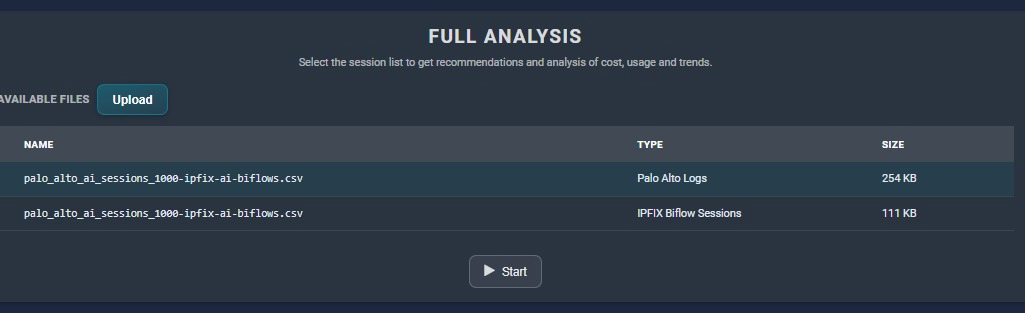
Upload


Input


Output


This guide covers:

  • How to capture Check Point session and connection logs with enough detail to convert them into IPFIX biflow-style session data.
  • How to capture equivalent data from other network security devices such as FortiGate and Cisco Secure Firewall, or from any appliance that exports CEF, LEEF, JSON, or key-value syslog.

The companion converter is: checkpoint_generic_ai_to_ipfix.py

What the converter expects

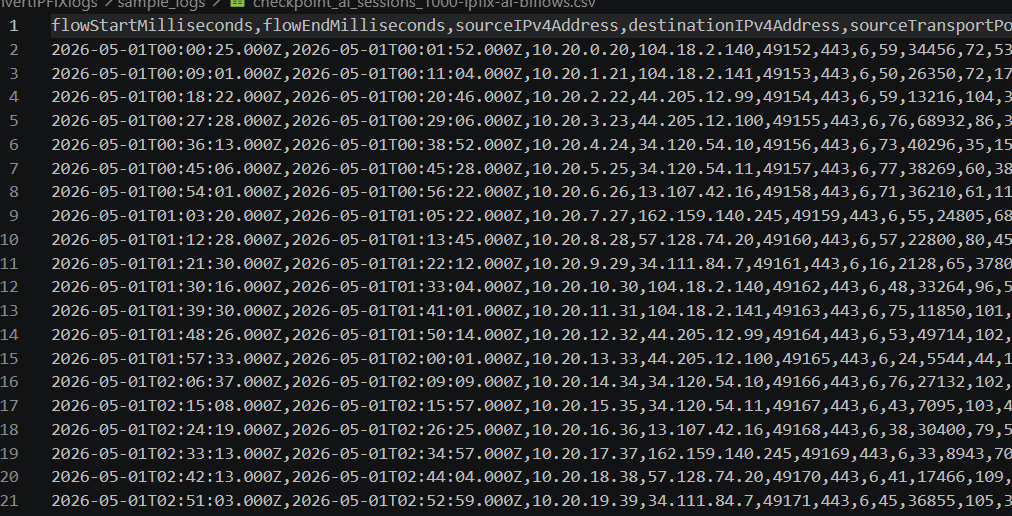
The converter maps session-oriented firewall fields into these IPFIX-style biflow columns:

  • flowStartMilliseconds
  • flowEndMilliseconds
  • sourceIPv4Address
  • destinationIPv4Address
  • sourceTransportPort
  • destinationTransportPort
  • protocolIdentifier
  • packetDeltaCount
  • octetDeltaCount
  • reversePacketDeltaCount
  • reverseOctetDeltaCount

For Check Point, it can ingest:

  • Log Exporter syslog
  • Log Exporter CEF
  • Log Exporter LEEF
  • Log Exporter JSON
  • Key-value text exports

It also handles generic CEF/LEEF and common key-value fields used by other firewalls.

Check Point: the best way to capture session data

1. Export logs with Log Exporter

Check Point documents Log Exporter as the supported way to export logs from Management Server or Log Server over syslog, with support for multiple formats including Syslog, CEF, LEEF, and JSON.

CLI example:

cp_log_export add name ai_sessions target-server <SIEM-IP> target-port 514 protocol tcp format syslog --apply-now

2. Prefer JSON or syslog/generic for highest field fidelity

For the converter, the most useful Check Point fields are:

  • src, dst
  • spt, dpt
  • proto
  • bytes, packets
  • client_outbound_bytes, server_outbound_bytes
  • client_outbound_packets, server_outbound_packets
  • creation_time, last_hit_time, duration
  • app, matched_category, service_id
  • rule_name, rule_action
  • src_user
  • loguid
  • hll_key

The converter groups records by hll_key first, then loguid, so it can collapse update chains into a single biflow-style row.

3. Enable Application Control and URL Filtering

To isolate AI sessions:

  1. Enable Application Control and URL Filtering in the Access Control layer.
  2. Enable the corresponding Software Blades on the Security Gateway.
  3. Configure rules for specific applications or categories.

4. Use Detailed Log or Extended Log on the relevant rules

For AI-session capture, use Detailed Log or Extended Log instead of minimal logging on the Access Control rules that allow web and AI traffic.

  • Connections appear when Per connection is selected.
  • URLs appear when Extended Log is selected.
  • Files also appear with Extended Log.

Recommendations:

  1. Use Detailed Log or Extended Log on application-aware rules.
  2. Use Per connection when you want each constituent connection.
  3. Keep session logs enabled if you want user activity grouped by application/site.

5. Enable HTTPS Inspection when AI traffic is encrypted

HTTPS Inspection is required for deeper application and URL visibility on encrypted traffic.

  • The HTTPS Inspection policy works with Application Control and URL Filtering.
  • The logs include an HTTP Inspection Action field with values such as inspect or bypass.

6. Use session logs for user-activity rollups

Check Point type:Session logs roll multiple activities for a user session into one session record.

This is especially useful for browser-based AI tools such as ChatGPT, Gemini, Claude, and Copilot.

7. AI-specific policy targeting

Check Point’s current rule guide includes Model Context Protocol (MCP) detection as an application you can explicitly match in policy.

Use Detailed Log or Extended Log plus HTTPS Inspection when MCP traffic is over HTTPS.

FORTIGATE_AI_SESSION_LOGGING_GUIDE

FortiGate traffic logs can include:

  • sessionid
  • proto
  • sentbyte and rcvdbyte
  • sentpkt and rcvdpkt
  • duration
  • policyname
  • appid
  • applist
  • saasname

For AI-session capture on FortiGate:

  1. Enable traffic logging on outbound SaaS and AI policies.
  2. Attach Application Control profiles to those policies.
  3. Use SSL inspection for encrypted traffic visibility.
  4. Export logs in syslog, CEF, or JSON-compatible format.

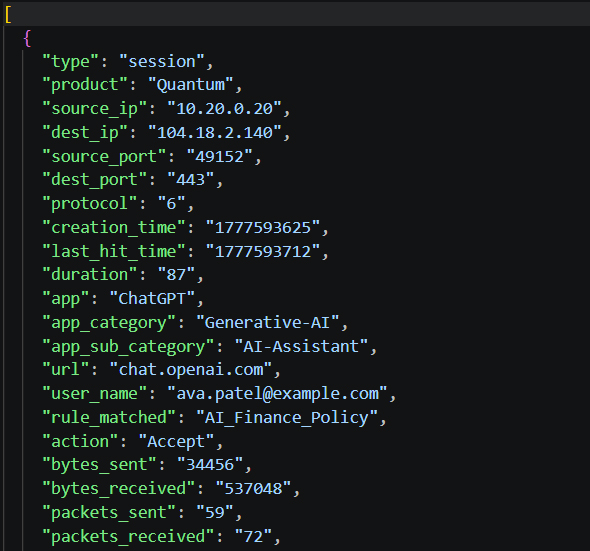
PALO_ALTO_AI_SESSION_LOGGING_GUIDE

For Palo Alto Networks firewalls:

  1. Enable Traffic Logs at session start and end.
  2. Enable App-ID for AI application visibility.
  3. Use URL Filtering and SSL Decryption for HTTPS inspection.
  4. Capture source, destination, bytes, packets, user, URL, and application fields.
  5. Export logs using Syslog, CEF, or JSON formats.

CISCO_SECURE_FIREWALL_AI_SESSION_LOGGING_GUIDE

Cisco Secure Firewall connection events contain:

  • Source and destination IPs
  • Application information
  • URLs and users when available
  • Total bytes transmitted by session initiator and responder

Recommendations:

  1. Enable end-of-connection logging.
  2. Enable beginning-of-connection logging only where needed.
  3. Enable Encrypted Visibility Engine (EVE).
  4. Enable TLS decryption where policy allows.
  5. Export structured logs to SIEM.

Generic requirements for any firewall, proxy, or SSE appliance

Minimum useful fields for biflow conversion:

  • Session or connection identifier
  • Start time
  • End time or last-seen time
  • Source IP and destination IP
  • Source port and destination port
  • Protocol
  • Client-to-server bytes and packets
  • Server-to-client bytes and packets
  • Application name or category
  • Rule or policy name
  • User name if available
  • URL, SNI, or domain if available

Running the converter

Check Point key-value syslog:

python .\checkpoint_generic_ai_to_ipfix.py .\checkpoint.log

Check Point JSON export:

python .\checkpoint_generic_ai_to_ipfix.py .\checkpoint.json

Generic CEF or LEEF:

python .\checkpoint_generic_ai_to_ipfix.py .\security-device.log --keyword "vertex ai" --keyword "azure-openai"

Keep all sessions:

python .\checkpoint_generic_ai_to_ipfix.py .\security-device.log --include-non-ai

Important limitations

  • Check Point update logs may represent evolving byte counts over time.
  • Session logging and extended logging can materially increase log volume.
  • HTTPS-encrypted traffic often needs decryption or TLS/SNI-based identification.
  • Vendor-specific formats may require extra field aliases.